 Fridays with Vicky 53
This morning I spend some time improving the content, that are ranking well already, on one of my niche sites.
It`s so easy to forget things when you write and publish your content, it can really benefit to go back and improve upon your posts and pages.
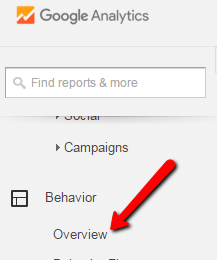
To see what content rank well I use Google Analytics. I go to behavior and overview when logged into my Google Analytics profile, to check what pages and posts recieve the most views.
Before I dive in, I like to check the average time spend on the pages as well. This tells me what kind of content my readers find helpful. What content they enjoy reading and not just ”skip through”.
Another thing I look at is the entrance, what pages do my visitors enter my site through.
On this page of Google Analytics I can also see if I have any spam. This is ”fake” visitors that fills no purpose on your site. This is not necessarily harmful for your site but the data measured with Google Analytics will not be accurate. It shows more visitors than you actually have and it shows wrong numbers for bounce rate and time on site, for example.
Here`s an example:

These spam crawlers can be blocked with filters.
By checking Google Analytics you will have a pretty good idea what content attracts your readers, what posts gets most views, where on your site your readers spend time and what posts and pages to improve.
7 Ways to Improve Conversion on Existing Content
1. Look at Your Content Through Your Visitors Eyes
 The first thing I like to do is look at my post or page with ”new eyes”. If I were searching Google and landed on my page, would I stay and read the content? There`s a lot of content out there. How do you stand out and make them stay on your page?
Is the overall look appealing? Is the content easy to read? Do I break up the text in smaller chunks for readability? Does the content provide value? Is there relevant images that add to the content?
Having an appealing, easy to read page will convert much better than purple text on yellow background in one large text block. Look at your site and be honest with yourself.
2. Take Use of Pictures
 When somebody click the pictures within your content what do you want to happen? Where do you want your visitor to go? A lot of times pictures are uploaded but settings not adjusted.
If you have not update the settings in WordPress, it used to automatically be set to media file, and your image would show on a new page when clicked. This can be useful if you have a info-graphic for example but it`s rarely the best option.
If you have the latest WordPress version it should be set to “none”, which means the image is not clickable.
The settings within WordPress can be set to the following when a image is clicked.
- None– your visitors can not click your image.
- Custom url – set any url that your image will take your visitor to.
- Attachment page – take your visitor to an attachment page.
- Media file – image shows on new page.
What do you want to happen when your visitor clicks one of your images?
If you do reviews having your pictures link to the product page will help improve conversion on existing content.
3. Clear Message, Clear Call to Action
What is the purpose of your page? Do you want them to click through to another post? Do you want them to sign up to your newsletter? Do you want them to share your content on social media? Do you want them to purchase something? Do you want them to click through your affiliate link and purchase something?
Define the purpose of your page and make sure you have clear call to action to make that happen. Say that you are working on increasing your subscribers to your email list. Is the email form easy to spot. Is there a clear call to action for them to sign up? Are you using a pop-up to increase conversion? Why should they sign up, what`s in it for your reader?
Improve Conversion on Existing Content by using clear call to action.
4. Visible Exit Points
If the purpose is to send your visitor to an offer, do you have clear visible exit points? Say that you are doing a product review and want your reader to click through to Amazon. Can your reader exit through text links, buttons and pictures?
I`m not talking about spamming your site with links, not at all, but make it easy for your reader to click through. Use buttons that pop and draws attention. Use text links in a color that can easily be seen. Visible exit points will increase conversion.
5. Check Your Links
Are your links working properly? If you link to a product page is it still live and is the product available. I just checked the links to a product over at Amazon and the product was unavailable. Not good if that`s where I send my visitor. Make sure your links are working and are taking your reader to a place that will benefit them.